Prebuilt Layouts
Prebuilt layouts are ready-made component groups that save you from building common sheet sections from scratch. Instead of manually assembling an ability score block with a label, a score input, and a modifier display, you can drag in a prebuilt that has all of that already wired up — attribute names, labels, structure, and even the logic to calculate modifiers.
How to Use Prebuilts
- Open the Component Sidebar on the left side of the editor.
- Find the prebuilt groups near the top of the sidebar: Generic Layouts and any other enabled system layouts.
- Click a group header to expand it and see the available prebuilts.
- Drag a prebuilt onto the canvas or into the Element Hierarchy.
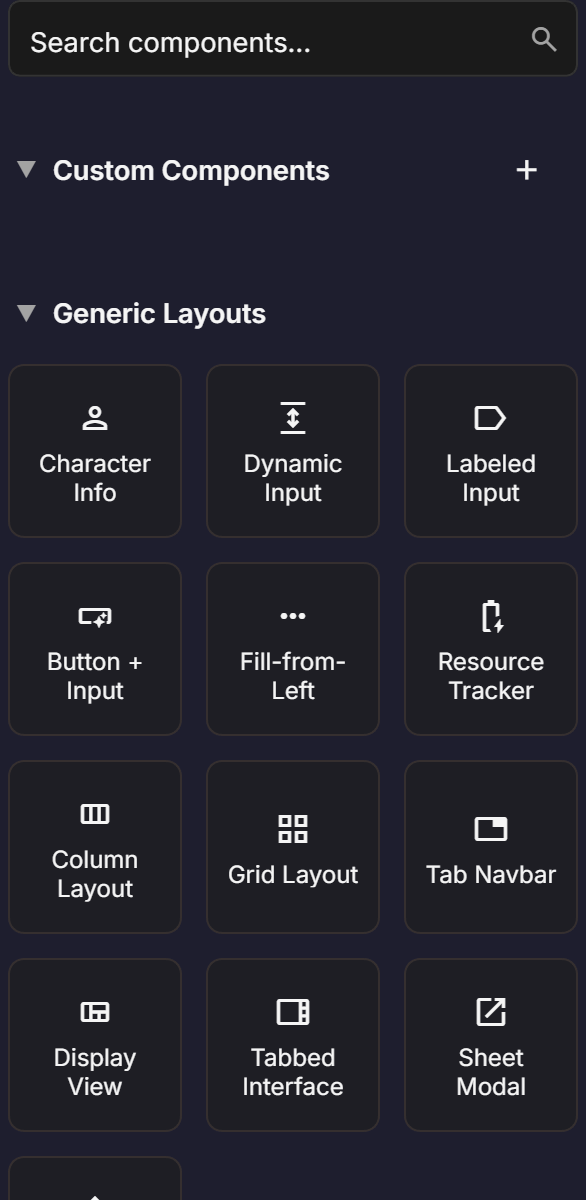
Some prebuilts ask you a quick configuration question before they are created. For example, the Ability Score prebuilt asks which ability you are creating (Strength, Dexterity, etc.), and the Tab Navigation prebuilt asks how many tabs you want and what to call them. Answer the prompt and the prebuilt is inserted fully configured.
Prebuilts that include logic (like ability score modifiers or skill bonuses) automatically create the corresponding logic graph nodes in the Logic Editor. You get the calculations for free — no need to wire them up yourself.
D&D 5e Prebuilts
If you have D&D 5e enabled for your sheet (which is the default), you will see a dedicated section of system-specific prebuilts.
Ability Score
A single ability score block with a score input and a calculated modifier display. When you add one, you are asked to name the ability (e.g., "Strength"). The prebuilt creates the score input, modifier display, and a logic graph that automatically calculates the modifier from the score using the standard formula: floor((score - 10) / 2).
Ability Score Section
A complete set of ability scores in one block. By default, it creates all six standard abilities (Strength, Dexterity, Constitution, Intelligence, Wisdom, Charisma), but you can customize the list during creation. You can also choose whether the abilities are arranged in a row or a column. Each ability gets its own modifier calculation logic.
Skill Row
A single skill entry with a proficiency checkbox, skill name, ability abbreviation, and bonus display. Configured with the skill name and its associated ability score.
Skill List
A complete skill list with all standard 5e skills. Each skill row includes a proficiency checkbox and is linked to the appropriate ability modifier. The logic to calculate skill bonuses (ability modifier + proficiency bonus when proficient) is included automatically.
Saving Throw Row and Section
Individual saving throw entries or a complete saving throw section. Each saving throw is tied to its ability score and includes proficiency tracking. Logic graphs handle the bonus calculations.
Combat Stats
Prebuilts for common combat fields:
- Defenses — Armor Class, Hit Points (current and max), temporary HP, Hit Dice
- Actions Section — Attack entries with name, bonus, and damage fields in a repeating section
- Inventory Section — Repeating item list with name, quantity, weight, and description fields
- Coinage — Standard D&D coin denominations (CP, SP, EP, GP, PP)
- Resources — Trackers for class resources, Ki points, sorcery points, and similar limited-use abilities
Spells
- Spell Level — A single spell level section with spell slot tracking and a repeating list of spell entries
- Spells View — A complete spellcasting section with all spell levels, spellcasting ability, spell save DC, and spell attack bonus
- Spell Attack Section — Spell attack configuration fields
Character Information
- Character Info — Name, class, level, race, background, alignment, and experience fields
- General Info — Proficiency bonus, inspiration, passive perception, and other general stats
- Proficiency Display — A dedicated proficiency bonus display block
- Characteristics — Personality traits, ideals, bonds, and flaws text areas
Biography and Roleplay
- Biography View — Backstory, appearance, and other narrative text areas
- Allies Section — Organization and ally entries
- Enemies Section — Adversary tracking
NPC Statblock
A complete NPC statblock following the standard 5e monster stat block format. Includes ability scores, challenge rating, actions, and all the fields a DM needs for running an NPC.
Settings Sheet
A configuration page for the character sheet itself, including options for skill overrides, save settings, and defensive settings. This is typically placed on a hidden tab that players can access through sheet settings.
Generic Prebuilts
These layouts work for any game system:
Tab Navigation
Creates a row of tabs that show and hide different sections of your sheet. During setup, you specify the tab names (e.g., "Character", "Spells", "Biography") and a control attribute name. The prebuilt generates the tab buttons and the corresponding content containers. When exported, clicking a tab shows its content and hides the others using a CSS checkbox technique.
Labeled Input
A quick way to create a label-and-input pair. Specify the field name and you get a label element connected to an input, properly structured for accessibility and VTT compatibility.
Dynamic Input
A text area that can grow based on its content — useful for notes, descriptions, and other variable-length text fields.
Resource Tracker
A group of checkboxes arranged in a row, designed for tracking expendable resources like spell slots, hit dice, or ability charges. You specify how many checkboxes you need, and the prebuilt creates them with proper naming for the target VTT.
Fill-Left Checkboxes
Similar to the resource tracker, but uses a "fill from left" pattern common in World of Darkness and similar systems. Checkboxes fill in order from left to right.
Customizing After Insertion
Every prebuilt is fully editable after you add it to your sheet. The prebuilt is not a locked template — it becomes regular components in your layout tree that you can modify however you like.
Common customizations include:
- Renaming attributes to match your naming convention
- Adding or removing fields within a prebuilt section
- Rearranging the internal structure to match your desired layout
- Changing styles via the Property Inspector's Styles tab
- Adjusting labels and placeholder text
Some prebuilts include internal structure that is locked by default to prevent accidental changes to carefully arranged components. If you need to modify the internal structure, right-click the locked component in the hierarchy and choose to unlock it. Just be aware that some prebuilt logic depends on the expected structure, so modify with care.
Prebuilts with Logic
Several prebuilts (especially the D&D 5e ones) come with logic graphs that handle calculations automatically. When you add one of these prebuilts:
- The layout components are added to the Layout Editor as usual.
- A corresponding logic graph is created in the Logic Editor that performs the calculations.
- The logic and layout are linked through shared attribute names.
For example, adding an Ability Score Section creates six ability score inputs and six logic graph nodes, one for each modifier calculation. You can view and modify these in the Logic Editor if you need to customize the formulas.