Getting Started
Welcome to Sheet Architect -- a visual tool for building character sheets for virtual tabletops (VTTs). If you have ever wanted to create a custom character sheet for your game but didn't want to learn HTML, CSS, or JavaScript, you are in the right place.
What Is Sheet Architect?
Virtual tabletops like Roll20 let game creators build custom character sheets for any tabletop RPG system. Traditionally, that means hand-writing code -- HTML for structure, CSS for styling, and JavaScript for calculations and dice rolls. Sheet Architect replaces all of that with visual editors so you can focus on game design instead of web development.
With Sheet Architect you can:
- Design layouts by dragging and dropping components (text fields, number inputs, buttons, checkboxes, containers, and more) onto a visual canvas
- Wire up calculations using a node-based logic editor -- connect boxes together to build formulas, conditionals, and roll mechanics without writing a single line of code
- Style your sheet with a CSS editor and reusable design tokens (named colors, fonts, and spacing values you define once and use everywhere)
- Create roll templates that control how dice results appear in the VTT's chat window
- Export a complete package ready to upload to your target VTT as a custom character sheet
Supported Platforms
Sheet Architect currently exports to Roll20. Support for additional VTTs is planned. Throughout the documentation, you will find Roll20-specific details where relevant -- these are clearly marked and will be supplemented with guides for other platforms as they are added.
Sheet Architect currently exports to Roll20. You will need a Roll20 Pro or higher subscription in order to upload your custom sheet to a Roll20 game or submit it to the Roll20 character sheet repository.
Who Is This For?
Sheet Architect is built for:
- Game designers creating sheets for original or homebrew RPG systems
- GMs who want a custom sheet tailored to their campaign's house rules
- Homebrew creators adapting existing systems with new classes, mechanics, or layouts
- Anyone who wants to build a character sheet without learning to code
All you need is the rulebook for your favorite RPG system and an idea of how you want to interact with them in a VTT. No programming experience is needed.
Key Concepts
Before you dive in, here are the core ideas you will encounter throughout Sheet Architect.
Sheets
A sheet is your complete project. It holds everything needed to produce a finished character sheet: the layout, the logic, the styles, the attributes, and the roll templates. You can have as many sheets as you like, and each one is saved independently.
Attributes
Attributes are the named values your sheet tracks -- things like strength, hit_points, armor_class, or spell_save_dc. Each attribute has a name, a type (text, number, or true/false), and a default value. Attributes are what your layout displays and what your logic reads and writes. On Roll20, these map directly to sheet attributes. Other VTTs have similar concepts under different names.
Components
Components are the building blocks of your sheet's visual layout. Each component corresponds to something a player sees or interacts with -- a text input, a number field, a dropdown menu, a button, a section heading, or a container that groups other components together. You assemble components into a tree structure (containers inside containers) to create the full layout of your sheet.
Nodes
Nodes are the building blocks of your sheet's logic. Instead of writing code, you place nodes on a canvas and connect them with wires. Each node does one thing -- read an attribute, perform a math operation, compare two values, trigger a dice roll -- and you chain them together to build complex behavior. For example, you might connect a node that reads the Strength score to a math node that calculates the modifier, then connect that to a node that writes the result back to the sheet.
Roll Templates
Roll templates control how dice roll results look in the VTT's chat window. Without a template, rolls show up as plain text. With a template, you can create formatted output with headers, colored sections, conditional text (like highlighting a critical hit), and styled layouts. Sheet Architect includes a visual editor for designing these templates. For background on how Roll20 handles roll templates, see the Roll20 wiki.
The Editor
When you open a sheet, you land in the editor. The interface is organized into two levels of tabs:
Document Tabs
Along the top bar, you will see document tabs -- one for your main sheet, plus a tab for each roll template you create. Click the + button to add a new roll template. Each document tab opens its own editor workspace.
Editor Tabs
Below the document tabs, you will see editor tabs that let you switch between different editors. The available tabs depend on which document tab you have selected:
- On the main sheet tab: Layout, Logic, and Style
- On a roll template tab: Layout (for the template's structure) and Style (for the template's CSS)
| Tab | What You Do There |
|---|---|
| Layout | Build the visual structure of your sheet by dragging and dropping components. This is where you create the forms, sections, and containers that players interact with. |
| Logic | Wire up calculations, conditionals, and roll mechanics using the node-based visual editor. |
| Style | Write CSS to control colors, fonts, spacing, and the overall look of your sheet. |
Any editor tab can be popped out to a floating window using the pop-out button, letting you work on layout and logic side by side. Pop-out windows can be restored back to their tab at any time.
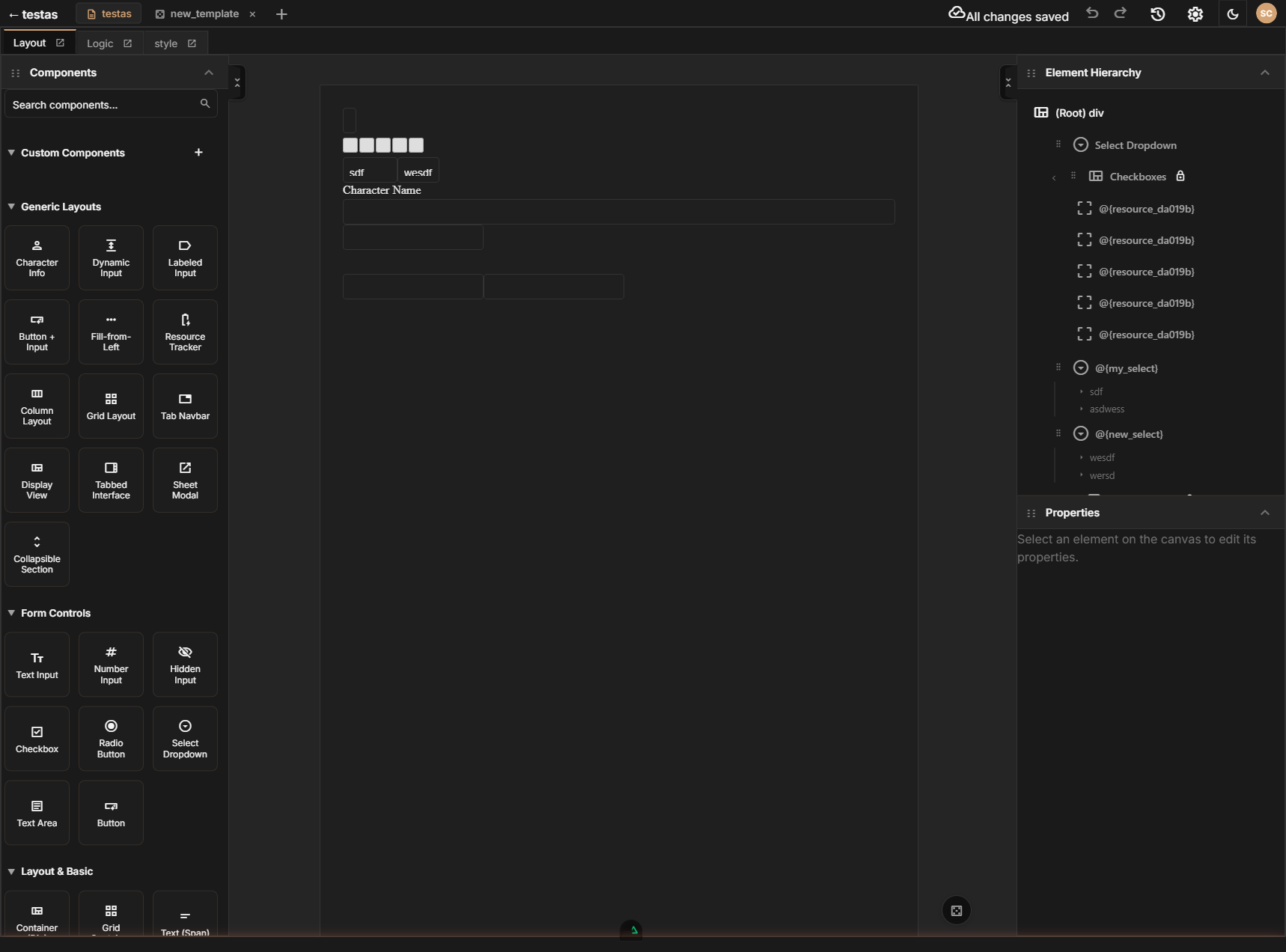
You can switch between tabs at any time, and changes in one tab are immediately reflected in the others. For example, adding an input component in the Layout tab automatically creates an attribute that you can reference in the Logic tab.
Next Steps
- Creating a Sheet -- Start your first project
- Layout Editor -- Learn the visual layout builder
- Logic Editor -- Add calculations and roll mechanics
- Style Editor -- Customize the look of your sheet
- Roll Template Editor -- Design chat output for rolls